convertxlsform turns an XLSForm, the questionnaire format used by Open Data Kit (ODK) and KoboToolbox, into a formatted paper version. Survey managers can use the output to review a questionnaire with colleagues, print it for interviewers, or check skip logic and constraints in one readable document. It writes a Word file (.docx) by default, and a PDF when LibreOffice or Microsoft Word is available. Forms can be multilingual, and the paper version follows the language you choose.
|
|
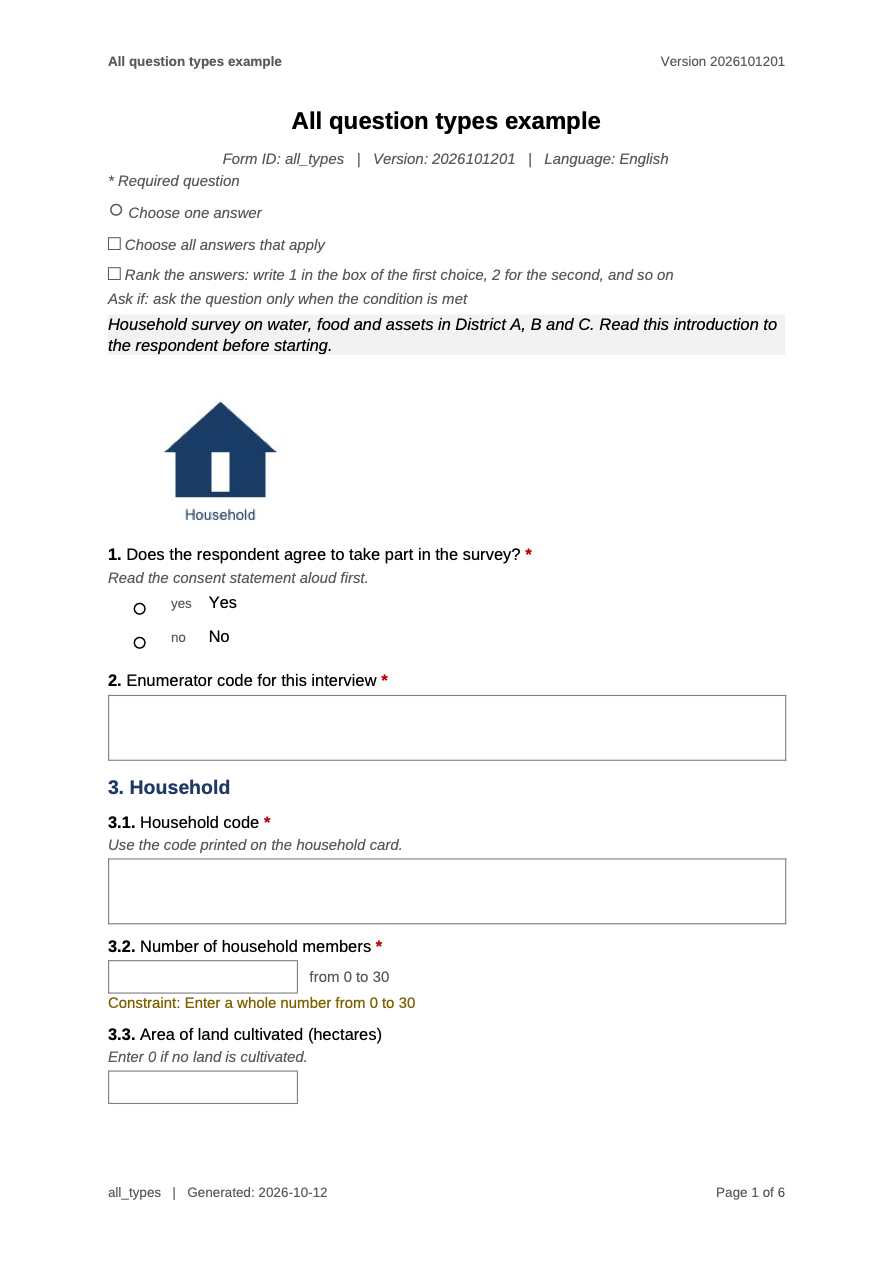
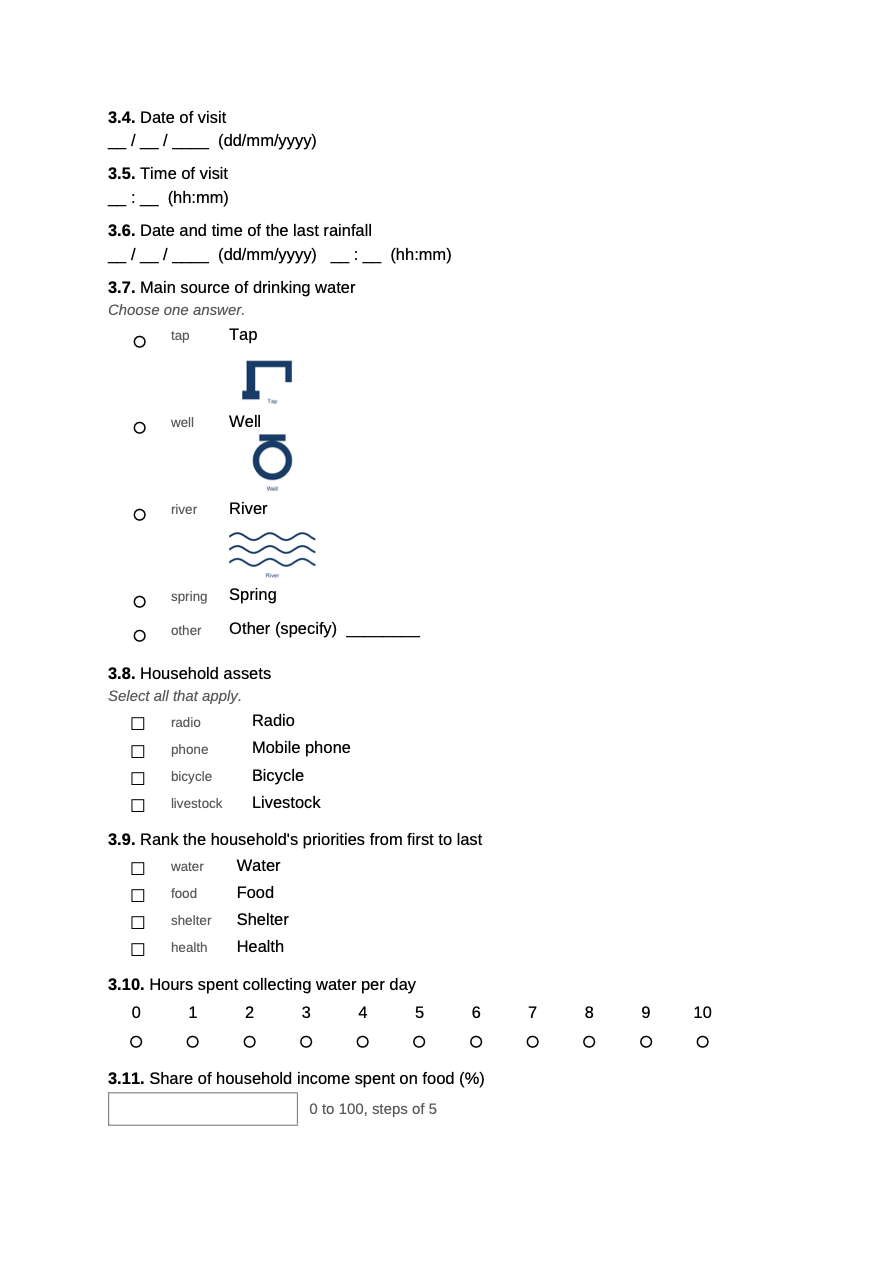
The bundled all_types example, converted to PDF.
Full reference and articles: https://masud90.github.io/convertxlsform/. New here? Start with the Getting started vignette.
Installation
Install the released version from CRAN:
install.packages("convertxlsform")Or install the development version from GitHub:
install.packages("remotes")
remotes::install_github("masud90/convertxlsform")
To install a specific release from GitHub, add its tag:
remotes::install_github("masud90/convertxlsform@v0.3.0")Word output needs only R. PDF output needs one of the following:
-
LibreOffice (free, all platforms). Install it, then run the command for your system:
- macOS:
brew install --cask libreoffice, or download it from https://www.libreoffice.org/download/. - Windows: download it from https://www.libreoffice.org/download/.
- Ubuntu:
sudo apt install libreoffice-writer.
- macOS:
-
Microsoft Word, through the
doconvpackage. Installdoconvin R. convertxlsform uses Word only when LibreOffice is not found.
has_libreoffice() detects LibreOffice only. Word is used through docx_to_pdf(engine = "word") with doconv, and convertxlsform() falls back to it when LibreOffice is not found.
Quick start
In R (RStudio or any R session):
library(convertxlsform)

path <- system.file("extdata", "all_types", "all_types.xlsx",
                    package = "convertxlsform")

convertxlsform(path, output = tempdir())                  # Word file
convertxlsform(path, output = tempdir(), format = "pdf")  # PDF file
From a terminal, run the command with Rscript. Put the form path and the options after the quoted expression:
The package ships the example form above, which covers the question types and features the package renders. Replace path with the path to your own form, for example convertxlsform("survey.xlsx"). The output is written next to the form, with the same base name and a .docx or .pdf extension. The function returns the path of the file it wrote, invisibly.
More terminal examples, Windows quoting and exit status
The bundled example works from the terminal too. The installed package folder is usually read-only, so give an output folder:
EXAMPLE=$(Rscript -e 'cat(system.file("extdata", "all_types", "all_types.xlsx", package = "convertxlsform"))')
Rscript -e 'convertxlsform::cli()' "$EXAMPLE" --format pdf --output .
The Rscript -e '...' examples use single quotes, which work in macOS and Linux shells and in PowerShell. In Windows cmd.exe, use double quotes outside and single quotes inside:
Rscript -e "convertxlsform::cli()" form.xlsx --format pdf --lang bn
Rscript -e "cat(system.file('extdata', 'all_types', 'all_types.xlsx', package = 'convertxlsform'))"
Scripts that need the exit status (0 on success, 1 on error) can use:
What you get
- Front matter: the form title, version and form ID, the language, the date of generation, and a legend that explains the marks used in the document.
- Groups: headings numbered by depth. Repeat groups carry a “Repeat for each …” line that describes the repeat count.
-
Questions: the number and label, a
*for required questions, the hint in italics, and the variable name whenshow_variable_names = TRUE. “Ask if” and “Constraint” lines follow the answer area. -
Single choice (
select_one): a hollow circle before each choice. Lists of seven or fewer choices print in one column; longer lists print in columns. -
Multiple choice (
select_multiple): a hollow square before each choice. - Rank: a box beside each choice to write its rank.
-
Long choice lists: when a list is longer than
max_choices, the paper form shows a code box for the respondent to write the code, and a compact table of every choice with its code. - Text and numbers: a bordered write-in box. Multiline text gets a taller box.
-
Date and time: a printed pattern (
dd/mm/yyyy,hh:mm). -
Location: latitude, longitude and accuracy fields for
geopoint.geotraceandgeoshapeget a prompt and a reference line. - Media: an image is printed at its size, scaled down to fit (questions up to 2 inches tall, choices up to 0.6 inches). A missing file prints a placeholder with its name, and convertxlsform warns about it.
- Notes: printed without a number.
-
Hidden types (
calculate,start,end,deviceidand similar) are left out unlessinclude_hidden = TRUE.
Languages
How language columns are read
Translated columns carry the language in the header. convertxlsform accepts any of these forms:
-
label::English (en): name and code. This is the form used in the bundled examples. -
label::en: code only. -
label::English: name only.
The same pattern works for hint, guidance_hint, required_message, constraint_message, image, audio and video. A plain label column (no suffix) is used when no translated column exists.
To list the languages in a form and see which one is the default:
xlsform_languages(system.file("extdata", "multilang", "multilang.xlsx",
                              package = "convertxlsform"))
The result has one row per language, with suffix, code, name and default. It has no rows for a single-language form.
Choosing a language
lang accepts a code, a name, or the full header suffix. If the requested language is not in the form, convertxlsform warns, lists the languages it found, and uses the default language instead.
Within a language, a blank cell falls back in this order: the column for the chosen language, then the plain column (for example hint), then the column of the default language. A blank French hint, for example, shows the English hint when the form has one.
Connective phrases
Phrases such as “Ask if”, “Constraint” and “Repeat for each” come from built-in tables. convertxlsform includes English and French. Any other language uses the English phrases unless you supply translations with strings.
To translate them, pass a named list. Only the names listed below can be used, and an unknown name is an error:
| Name | English default |
|---|---|
ask_if |
Ask if |
constraint |
Constraint |
choice_filter |
Choices shown if |
repeat_for_each |
Repeat for each |
other_specify |
Other (specify) |
legend_required |
* Required question |
legend_circle |
Choose one answer |
legend_square |
Choose all answers that apply |
legend_rank |
Rank the answers: write 1 in the box of the first choice, 2 for the second, and so on |
legend_ask_if |
Ask if: ask the question only when the condition is met |
The full list of names is in R/strings.R. A Bengali version of the bundled multilingual form would look like this. The "..." values are placeholders to replace with translations that you write or check with a Bengali speaker:
path <- system.file("extdata", "multilang", "multilang.xlsx",
                    package = "convertxlsform")

convertxlsform(
  path,
  output = tempdir(),
  lang = "bn",
  strings = list(
    ask_if          = "...",  # Bengali for "Ask if"
    constraint      = "...",  # Bengali for "Constraint"
    choice_filter   = "...",  # Bengali for "Choices shown if"
    repeat_for_each = "...",  # Bengali for "Repeat for each"
    other_specify   = "..."   # Bengali for "Other (specify)"
  )
)
Until every placeholder is filled in, the paper form will show the placeholder text.
Options
R options: arguments of convertxlsform() and other options
Arguments of convertxlsform()
| Argument | Default | Meaning |
|---|---|---|
xlsform |
(required) | Path to the XLSForm (.xlsx, .xlsm or .xls). |
output |
NULL |
Output file, or an existing folder. NULL writes next to the form. |
format |
NULL |
"docx", "pdf", "both", or c("docx", "pdf"). NULL takes the format from the extension of output, and uses "docx" when there is none. |
lang |
NULL |
Language: a code ("fr"), a name ("French") or the full header suffix ("French (fr)"). NULL uses the default_language of the settings sheet, or the first language found. |
An existing file is not replaced unless overwrite = TRUE.
Other options (passed through ...)
| Option | Default | Meaning |
|---|---|---|
nested_serial_numbers |
TRUE |
Number questions inside groups as 1.1, 1.2. FALSE gives flat numbers 1, 2, 3. |
include_relevants |
TRUE |
Show skip logic as “Ask if: …”. |
include_constraints |
TRUE |
Show constraints. |
include_hints |
TRUE |
Show hints and guidance hints. |
include_choice_name |
TRUE |
Show the choice code after each choice label. |
show_variable_names |
FALSE |
Show the variable name of each question. |
include_hidden |
FALSE |
Include hidden types such as calculate, start and end. |
media_root |
folder of the form | Folder where images, audio, video and external choice files are looked up. |
title |
NULL |
Form title. Overrides form_title on the settings sheet. |
page_size |
"A4" |
"A4" or "letter". |
orientation |
"portrait" |
"portrait" or "landscape". |
margins_in |
1 |
Page margins in inches, above 0 and at most 2. |
font_family |
"Arial" |
Font for the document. |
font_size |
11 |
Base font size in points, from 6 to 20. |
font_family_cs |
NULL |
Font for complex scripts. Chosen from the text when NULL; see PDF output and fonts. |
template |
NULL |
A reference .docx whose styles are used. |
max_choices |
30 |
Choice lists longer than this get a code box layout instead of a printed list. |
strings |
NULL |
Named list that replaces connective phrases such as “Ask if”. See Languages. |
repeat_copies |
1 |
Number of blank copies printed for each repeat group, from 1 to 20. |
overwrite |
FALSE |
Replace existing output files. |
verbose |
TRUE |
Print progress messages. |
Command-line flags of cli()
| Flag | Meaning |
|---|---|
-o, --output PATH
|
Output file or folder (default: next to the form). |
-f, --format FMT
|
docx, pdf or both (default: from --output, else docx). |
-l, --lang LANG
|
Language code, name or header suffix (default: the form’s default language). |
--flat-numbers |
Number questions 1, 2, 3 instead of 1.1, 1.2. |
--no-relevants |
Hide skip logic. |
--no-constraints |
Hide constraints. |
--no-hints |
Hide hints. |
--no-choice-codes |
Hide choice codes. |
--show-names |
Show variable names. |
--include-hidden |
Include calculate, start, end and similar rows. |
--media-root DIR |
Folder for media and external files (default: the folder of the form). |
--title TEXT |
Form title (default: form_title of the settings sheet). |
--page-size SIZE |
A4 or letter (default A4). |
--landscape |
Landscape orientation. |
--margins IN |
Margins in inches (default 1). |
--font NAME |
Font family (default Arial). |
--font-size PT |
Base font size in points (default 11). |
--template FILE |
Reference .docx whose styles are used. |
--max-choices N |
Longest choice list printed in full (default 30). |
--repeat-copies N |
Copies of each repeat group (default 1). |
--overwrite |
Replace existing output files. |
--quiet |
No progress messages. |
-h, --help
|
Show the help and stop. |
--version |
Show the package version and stop. |
Options take a value as --opt value or --opt=value.
PDF output and fonts
PDF output converts the Word document, so it needs LibreOffice, or Microsoft Word through doconv as a fallback (see Installation). Word output has no such requirement.
convertxlsform looks at the characters in the labels of the language in use. When it finds Bengali, Arabic, Devanagari or Ethiopic text, it sets the complex-script font to the matching Noto font:
| Script | Font |
|---|---|
| Bengali | Noto Sans Bengali |
| Arabic | Noto Naskh Arabic |
| Devanagari | Noto Sans Devanagari |
| Ethiopic | Noto Sans Ethiopic |
Latin text uses font_family. To choose the complex-script font yourself, pass font_family_cs:
convertxlsform(path, lang = "bn", font_family_cs = "Noto Sans Bengali")The font must be installed on the machine that converts the document to PDF. If the named font is missing, LibreOffice or Word substitutes another font, which can show boxes or the wrong script.
Right-to-left layout is not yet supported. Arabic and Hebrew text is detected, but the document is still laid out left to right.
Known issue: PDF output can show blank text for Bengali and other complex scripts when LibreOffice cannot find a suitable font on the machine. The Word document is correct. A fix is planned for 0.4.0. See Troubleshooting below for workarounds.
Inspect a form
xlsform_outline() returns the numbered form as a data frame, one row per item on the paper form. It is a quick way to check numbering, question types, choice counts and skip logic before you convert the form:
path <- system.file("extdata", "all_types", "all_types.xlsx",
                    package = "convertxlsform")

outline <- xlsform_outline(path)
head(outline[, c("serial", "block", "kind", "name", "relevant_text")], 10)
The columns are row (the Excel row), serial, depth, block, kind, name, label, required, n_choices, relevant_text, constraint_text and layout. Use lang to inspect another language, and nested_serial_numbers = FALSE for flat numbers.
Troubleshooting
The PDF shows boxes or blank text for non-Latin scripts
The font for that script is not installed on the machine that made the PDF. Either:
- install the Noto font for that script (for example Noto Sans Bengali), then convert again;
- set
font_family_csto a font that is installed; or - convert with Microsoft Word through
docx_to_pdf(docx, engine = "word"), which uses the fonts available to Word.
LibreOffice not found
convertxlsform searches the PATH and the usual install locations. If LibreOffice is installed somewhere else, point convertxlsform to it:
options(convertxlsform.soffice = "/path/to/soffice")You can also set the environment variable CONVERTXLSFORM_SOFFICE to the same path. has_libreoffice() reports whether the binary was found.
Missing images
A warning names each file that was not found under media_root. Set media_root to the folder that holds the images, or fix the file names in the form.
Performance
Very large forms (hundreds of questions and long choice lists) can take tens of seconds to convert, and longer for PDF because LibreOffice has to lay out every page.
Contributing
Work on a feature branch and open a pull request against main. Tests use testthat:
testthat::test_local()Build and check the package from a temporary folder, so that build products stay out of the repository:
License
convertxlsform is released under the MIT license. The LICENSE file names the copyright holder and year, in the form CRAN requires.